18 Mar - 23 Mar 2023
I joined just to recap on pwn and libc stuff and see if I could put what I learnt abit in reversing to use. The pwn challenges I did were quite nice because they explained alot on the context which was what I wanted to learn.
ps. this is my first time recording what i learnt :)
pps. this was a huge time sink, so I shd prob look at other interesting ones another time.
ppps. argh i can’t stop trying after the amt spent, def gonna get withdrawal feels
pppps. it has been a year, i want to thank a certain person for introducing me to cybersec and all.
1. Ancient encodings (Crypto)
We just convert the decode function to be
def decode(out):
   return b64decode(long_to_bytes(int(out, 16)))
which gives us the flag b'HTB{1n_y0ur_j0urn3y_y0u_wi1l_se3_th15_enc0d1ngs_ev3rywher3}'
2. Small StEps (Crypto)
This is a RSA small e attack where we are given N, e and encrypted flag. It’s super common and I just ripped off the python code on github and sub the n and e values.
https://github.com/d4rkvaibhav/PICOCTF-2018/blob/master/Cryptography/SAFERSA/rsa.py
We get HTB{5ma1l_E-xp0n3nt}.
3. Perfect Synchronization (Crypto)
Here, we are given an output.txt.
What they are doing is basically each line is a character from message concaternated with the 15 bytes salt and then encrypted with the 16 bytes AES key.
So we see that for each line, we are using the same AES key and the same salt so we can use frequency analysis to try to deduce the character used for each line. (since they’re using ECB, then frequency analysis should come into mind).
#assign each unique line with a letter
def assign_letters(lines):
   res = []
   letters = {}
   for line in lines:
       if line not in letters:
           letters[line] = chr(len(letters) + ord('A'))
       res.append(letters[line])
   return res
b = assign_letters(lines)
# print list to string
print(''.join(b))
When you feed this into quipqiup, it’s just a text explaining frequency analysis. After adding some punctuation, in one of the lines, we get the flag to be HTB{A_SIMPLE_SUBSTITUTION_IS_WEAK}. (btw the function said isupper so all caps)
4. Multipage (Crypto)
In the code, we are given a customised form of AES encryption which obviously has vulnerabilities and will be sus.
So the main function of the script generates a random key, and encrypts a padded version of the flag (FLAG * 4). The encrypted message is split into blocks of 16 bytes, and a random block number r is chosen. The encryption of two consecutive blocks, starting from block r, are leaked. The resulting leak consists of two hexadecimal strings which are consecutive ciphertext blocks, starting from block r, and r + 1.
And in the output, we are given c, r, and phrases. Phrases[0] is the block starting at r. phrases[1] is the block starting at r1.
What we can do is
- find the block size, key size (16 for aes)
- divide ciphertext to block size
- xor 3rd and 4th block to get k
- xor k with ciphertext to get plaintext (cuz A xor B xor A = B) XORing k with the ciphertext blocks, we cancel out the encryption and obtain the original plaintext
- concatenate the plaintext and account for padding
# convert hex strings to bytes
ct = binascii.unhexlify(ct_hex)
phrases = [binascii.unhexlify(p) for p in phrases_hex]

# cuz AES
block_size = 16
key_size = 16

# divide ciphertext into blocks
ct_blocks = [ct[i:i+block_size] for i in range(0, len(ct), block_size)]

# XOR the phrases with the 3rd and 4th ciphertext blocks
k1 = bytes([ct_blocks[2][i] ^ phrases[0][i] for i in range(block_size)])
k2 = bytes([ct_blocks[3][i] ^ phrases[1][i] for i in range(block_size)])

# XOR k with the ciphertext blocks to obtain the corresponding plaintext blocks
cipher = AES.new(b'\x00'*key_size, AES.MODE_ECB)
pt1 = bytes([k1[i] ^ ct_blocks[2][i] for i in range(block_size)])
pt2 = bytes([k2[i] ^ ct_blocks[3][i] for i in range(block_size)])
Then decrypting the plaintext, we get HTB{CFB_15_w34k_w17h_l34kz}. We see that using this customised AES encryption with leak exposes since it is a block cipher.
5. Inside the Matrix (Crypto)
Got pretty curious because I saw sagemath :o I had to plonk it online because idk why my local terminal can’t download sage properly. Essentially, what is happening is we first initialise a Book object with size 5 and prime None.
We have several functions:
- parse takes in bytes and returns sagemath matrix of size x size where the values are in the finite field of order prime
- generate generates a random bytes object of size^2 and returns the matrix using parse
- rotate generates a random integer between 2^4 and 2^6 - 1 and sets it as the prime
- encrypt takes a byte and generates a new key matrix and multiplies it with the message matrix by parsing the input
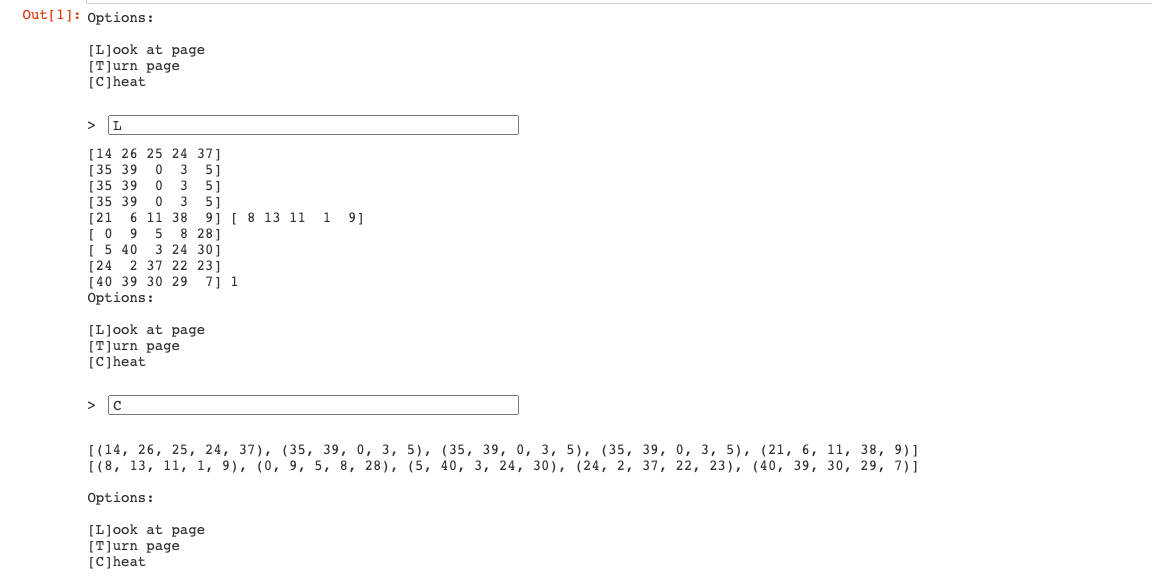
When we do L, they return ciphertext matrix, key matrix and page number. The ciphertext matrix and the key matrix are both 5x5 matrices over a Galois Field of the selected prime. The ciphertext matrix is the result of encrypting the flag using the key matrix. Here’s how the GUI looks like.
The main function then encrypts the flag and asks the user to print ciphertext, key, page OR generate new key and update page OR print ciphertext, key without updating the page number.
I think I kinda figured out the approach. The vulnerability after looking at each function is how the prime number is chosen. If we see, the rotate function only offers ~11 prime numbers to choose from from 16-64.
Looking at the code, it generates matrices over a Galois Field of the selected prime.
This also means that the program takes in the flag and modulos each byte by the prime, and that becomes an element of the matrix. So we can brute force all the primes and figure out the flag.
I tried to string the code.
def crack_flag(ciphertext):
    book = Book()
    for p in range(16, 65):
        if p in Primes():
            try:
                book.prime = p
                key = book.generate()
                plaintext = book.parse(ciphertext) * key.inverse()
                flag = bytes([int(x) for x in plaintext.list()])[:25]
                if flag.startswith(b"HTB{"):
                    return flag
            except ZeroDivisionError:
                pass
    return None
After debugging the rest abit, we get the flag to be HTB{l00k_@t_7h3_st4rs!!!}
1. Initialise Connection (Pwn)
nc 68.183.41.245 31879 in terminal and enter 1
to get the flag HTB{g3t_r34dy_f0r_s0m3_pwn}
2. Questionnaire (Pwn)
- from the file we can tell its 64 bit so that means no flag
- its dynamic from file
- its not stripped because there is protection - NX
- NX based on checksec
the buffer is 0x20 is 32 bytes fgets isnt safe
- directly from the c file
- 0x20 is 32 in decimal
- gg() is never called
- run p gg on test file to get HTB{th30ry_bef0r3_4cti0n} (wasted lots of time here thinking we needed to manipulate main to return gg() :( )
Also, I learnt alot in this because we tried to explore trying to call gg() by modifying main to add padding and the address when it was just using the executable file they gave. The number of bytes where it just overflows is 40 bytes. Some useful commands are we can compile with gcc --fno-stack-protector, otherwise when we try to overflow the buffer, it keeps throwing us errors. There’s also dmesg to see what happens in the stack afterwards.
3. Getting started (Pwn)
After nc into the docker, we realise we need to overflow enough so that the binary detects that one register is tampered. I just gave a really large number of As to overflow the buffer. From the source code, after changing to the correct IP and port number and the payload to
payload = b'A' * 100 # Change the number of "A"s
we get HTB{b0f_s33m5_3z_r1ght?}.
4. Labyrinth (Pwn)
Since they gave us an executable and not the source file, we have to use ghidra to analyse the file.
We also nc the ip address and port to see we need to choose a door.
After scrolling alot in ghidra, I found the gist of the code where there’s comments relating to door. This is probably the main function.

Decompiling the function, I got this,

So the door we need to input is 69.
After which, I need to do more scrolling. My eye caught the words Congratulations flag… so I clicked in and there’s this escape_plan() function which essentially prints out the flag.
For the second prompt, I ran it under a debugger (gdb), entered some long input to create buffer overflow. Then, if we continue the execution it will crash, but we can see the values in the instruction register. It’s quite tedious but find the offset of that value in the input - the buffer overflow offset. Then we can get the values, this gives the flag HTB{3sc4p3_fr0m_4b0v3}.
1. Gunhead (Web)
This is a command injection attack, it’s vulnerable as there’s no sanitization to the input to shell_exec.
This means we can do /ping 138.68.158.112 || cd .. && cat flag.txt in the terminal.
Usually the flag is in the www/var folder but here it’s right outside so we do cd ..|| means it’ll run even if the ping command is faulty (idk if it really is but i just can’t seem to get an output for ping). We get HTB{4lw4y5_54n1t1z3_u53r_1nput!!!}.
2. Trapped Source (Web)
The naming gave it away so we just view the page source, which gives us the right pin 8291. Then the flag is HTB{V13w_50urc3_c4n_b3_u53ful!!!}
3. Drobots (Web)
I tried the normal sql injection but doesnt work so I tried blind-based sql injection on the login. We actually don’t need to bypass the login page since we noticed the sql exception on one of the fields, so we can put it inside sqlmap. Told it to extract users and password and it logged in with admin afterwards.
After logging in, we see the export feature has path traversal file read vulnerability. So we first read the Dockerfile to notice where the flag is copied (The flag file is copied to the root directory of the container and named flag.txt. It is copied to the location /flag.txt.) Then read the flag, it’s HTB{T1m3b4$3d$ql1_4r3_fun!!!}.
4. Passman (Web)
I googled abit and since in the source code, there’s an updatePassword, it’s highly likely it could be do with IDOR, this vulnerability is caused by the website exposinga reference to an internal implementation object, such as a file, database record, or resource identifier, without verifying that the user is authorized to access it.
IIrc, here when updating a user password, we can use the IDOR to update the admin password. So in our normal POST request to update user password, we modify it abit to include the admin information. This leads to us having access to the admin, thereafter getting the flag is fine. HTB{1d0r5_4r3_s1mpl3_4nd_1mp4ctful!!} I guess the learning point is to have proper authentication and not expose important objects for our end points.
1. Plaintext Treasure (Forensics)
I filtered the packets in Wireshark to limit to http. It’s likely to be a post request since the user (admin) is posting stuff. We get it to be HTB{th3s3_4l13ns_st1ll_us3_HTTP}. They sneakily placed it in the byte section. An easier way is to go follow tcp stream, stream 4 and just search the flag.
While searching through the packets, I also bumped into an interesting thing called json web tokens not related to this, but the token’s in the payload portion of the packet and there’s this online decoder which decodes the tokens, then you can see fields like the user.
2. Alien Cradle (Forensics)
The flag is literally in the code itself.
HTB{p0w3rsh3ll_Cr4dl3s_c4n_g3t_th3_j0b_d0n3}
I tried running on linux and mac powershell installed, doesnt work though. Apparently PowerShell is commonly used for automating the management of systems. It is also used to build, test, and deploy solutions, often in CI/CD environments. Maybe I should learn it one day.
3. Extraterrestrial Persistence (Forensics)
I changed the fields to
n='pandora'
h='linux_HQ'
I realise [[]] if clause is supported by specific shells only like bash and not sh. Also, use sudo bash myprogram.sh, after which vim into that file. The flag is HTB{th3s3_4l13nS_4r3_s00000_b4s1c}
1. Needle in a Haystack (Reversing)
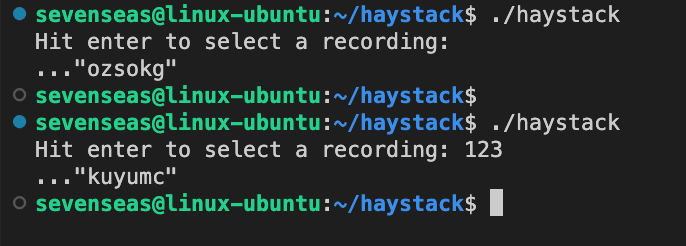 So the aim is to find the correct recording number to get the flag.
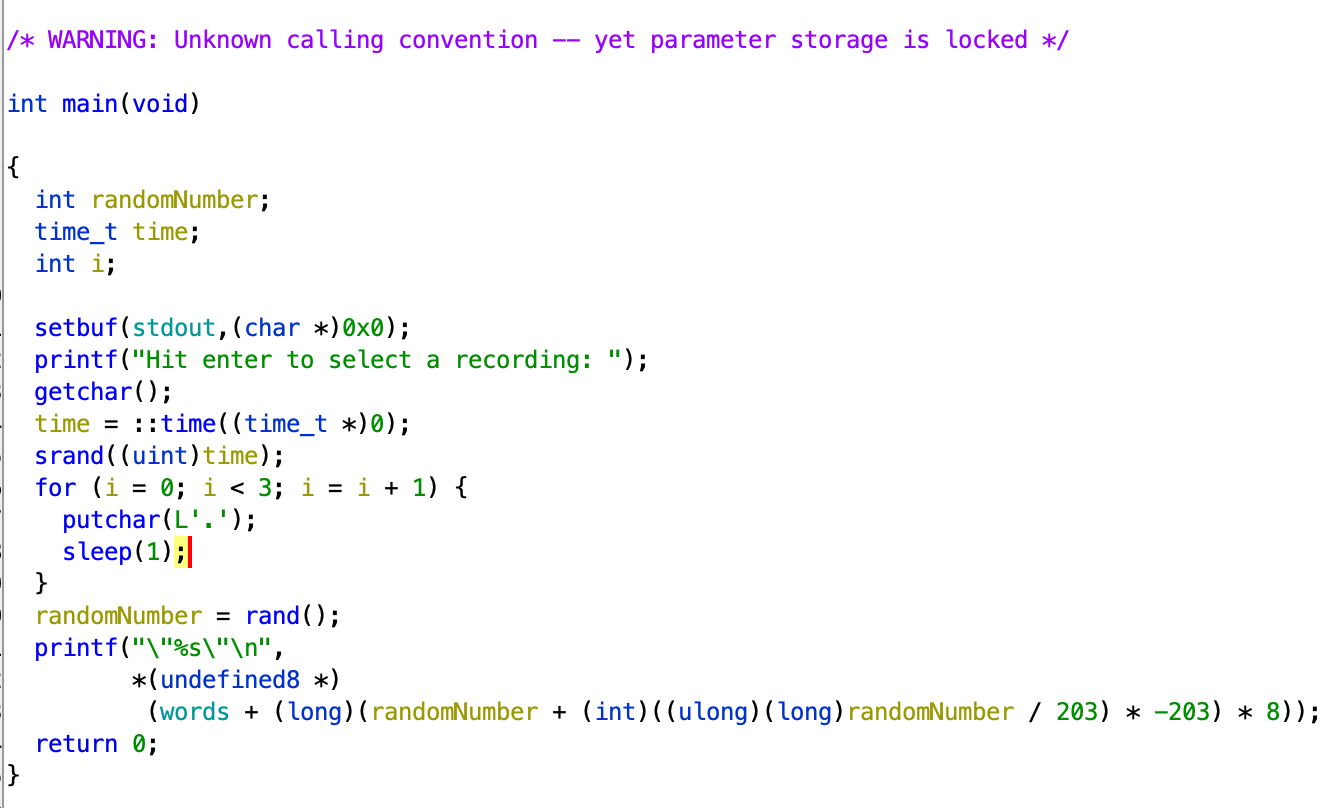 This is the main function which I decompiled from ghidra.
Essentially what it is doing is the server has a database of words, and then everytime we press enter, it fetches a random word.
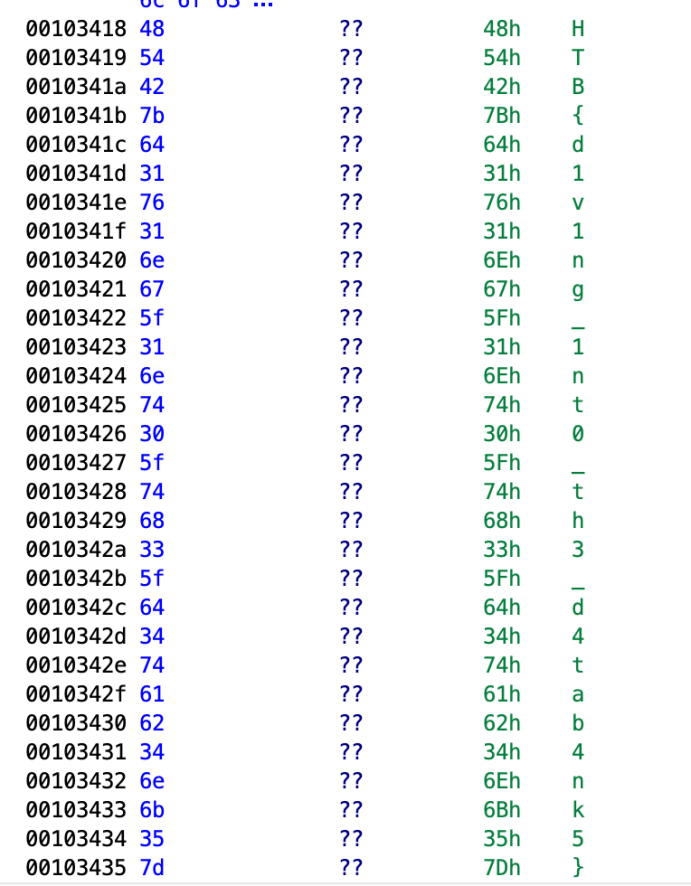
But obviously trying to query on the server isnt sustainable because it’s random, they don’t rely on the input number at all (as seen even if i put blank it still generate a word). I scrolled ghidra really hard, cuz i saw random words in the dictionary in the form of “ “. And I found the flag HTB{d1v1ng_1nt0_th3_d4tab4nk5}.
2. She Shells C Shells
(Reversing)
It’s something like a shell in a shell. getflag asks for a password so i gotta look for the password.
After scrolling ghidra till eye kinda pain, i came across many functions, function_cat, function_whoami, function_help, function_flag. The flag function should be scrutinised.
I cut off the top cuz its a hellish number of variables.
This is the flag function. I’ll explain abit so
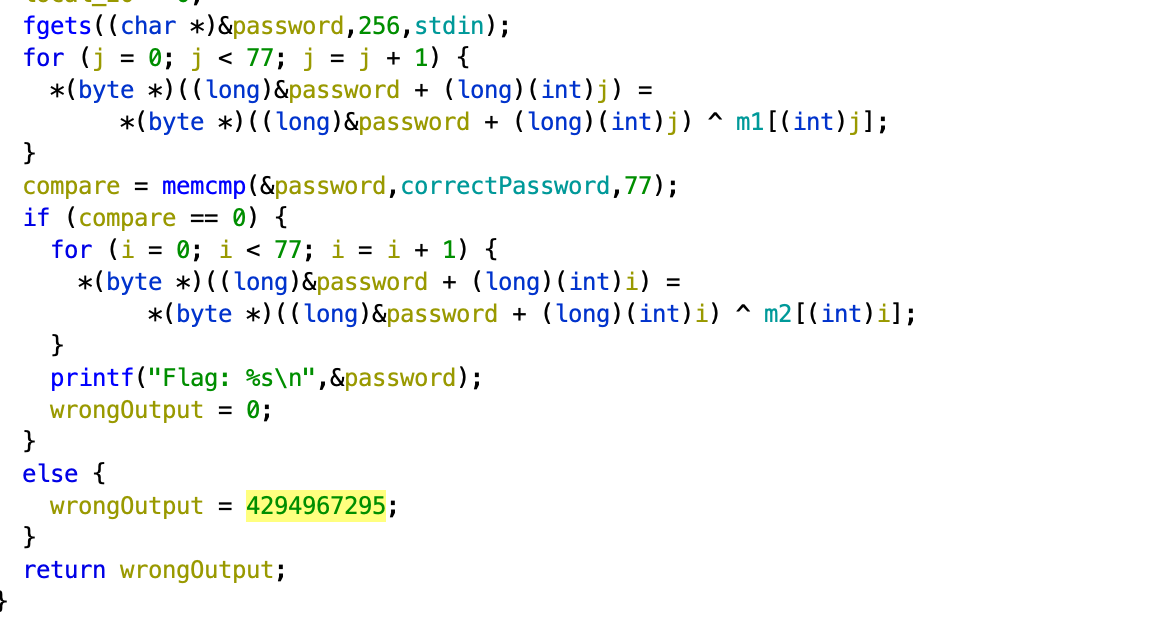
- fgets is what we input a raw password
- we loop through to “encrypt” the raw password by xoring with m1
- compare the “encrypted” password with the correctPassword
- loop through to encrypt again by xoring with m2
- this is the flag
So i basically took m2 and xor with correctPassword which gave the flag to be HTB{cr4ck1ng_0p3n_sh3ll5_by_th3_s34_sh0r3}.
3. Shattered Tablet (Reversing)
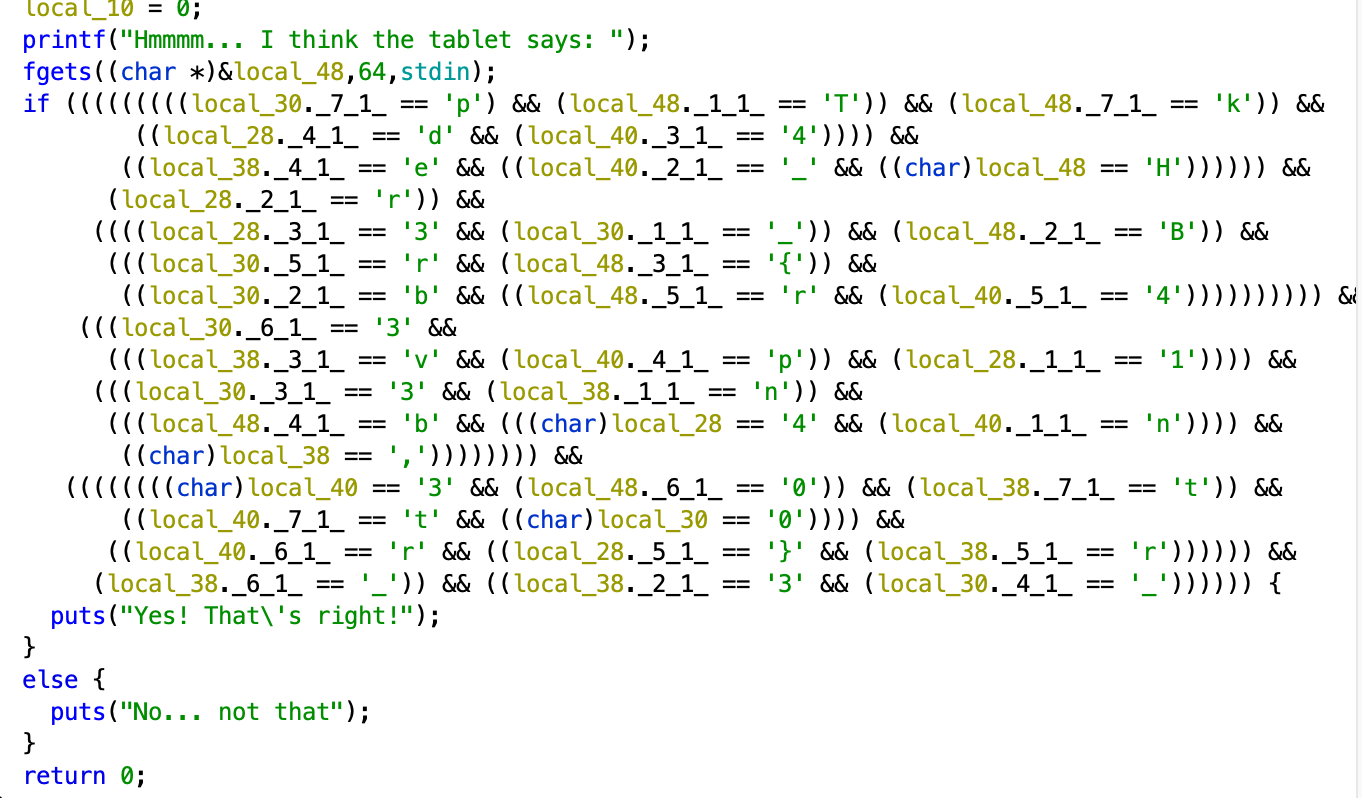 Here, the flag is already there, though it’s ugly. If you see, what this means is in the string (array of char), the first 8 char is local_48, local_40, … local_10 (on top it shows the order). So we just need to manually arrange everything character by character.
We get HTB{br0k3n_4p4rt,n3ver_t0_b3_r3p41r3d}.
4. Hunting Licence (Reversing)
When I nc into the server, I first answered a few questions on the executable file.
The first two information can be retrieved with file license.
Third, we can use ldd license to find libraries used.
Forth, objdump -t license | grep main
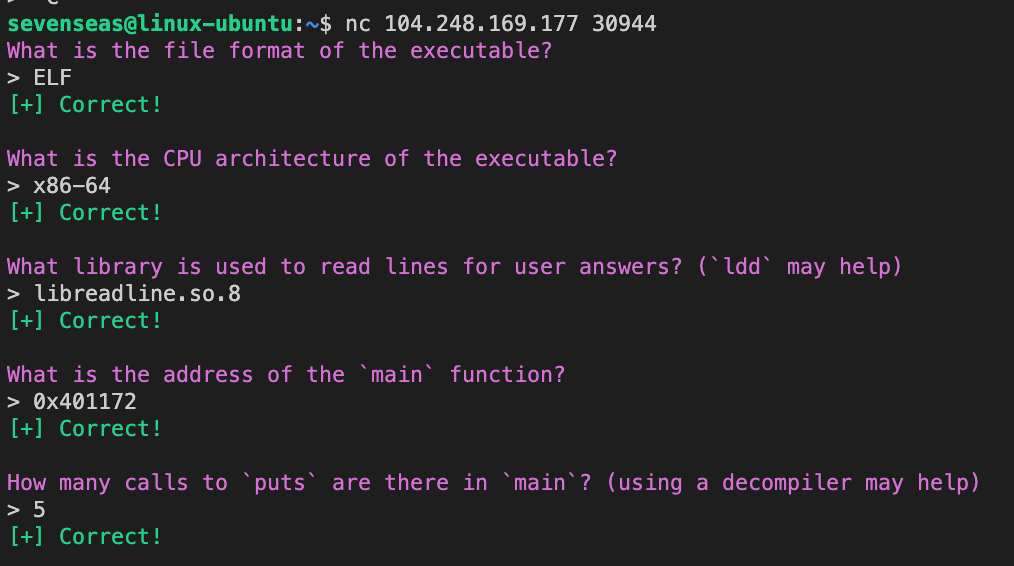
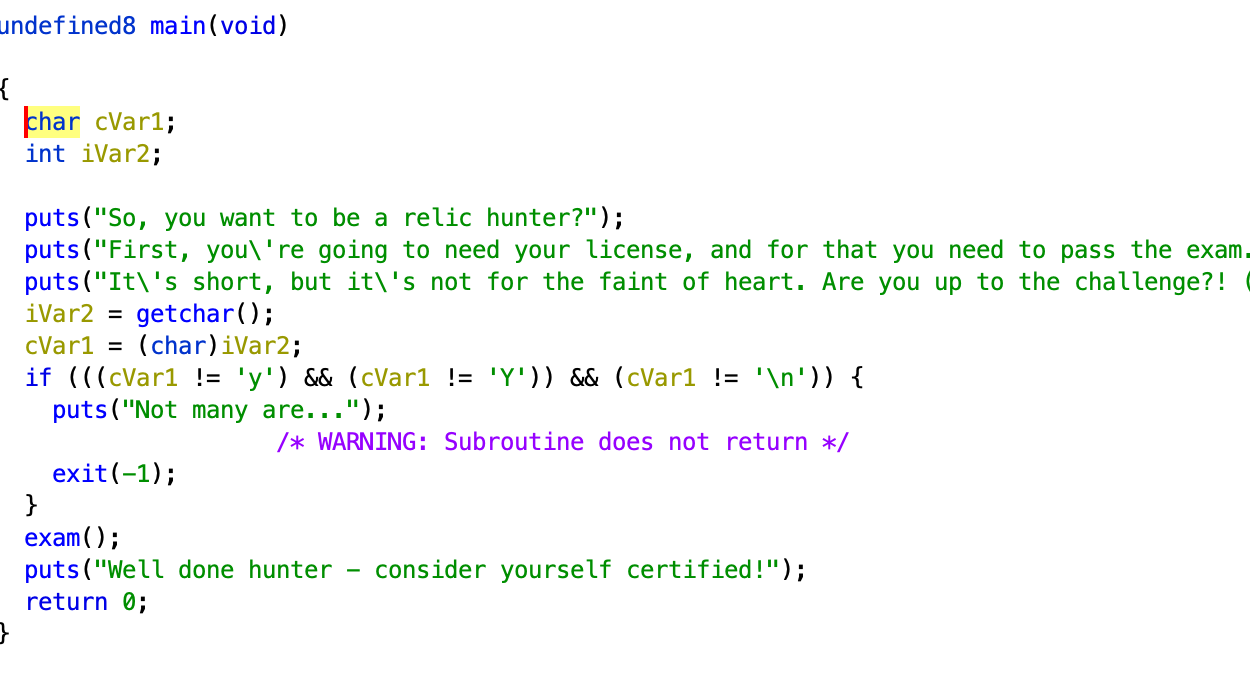
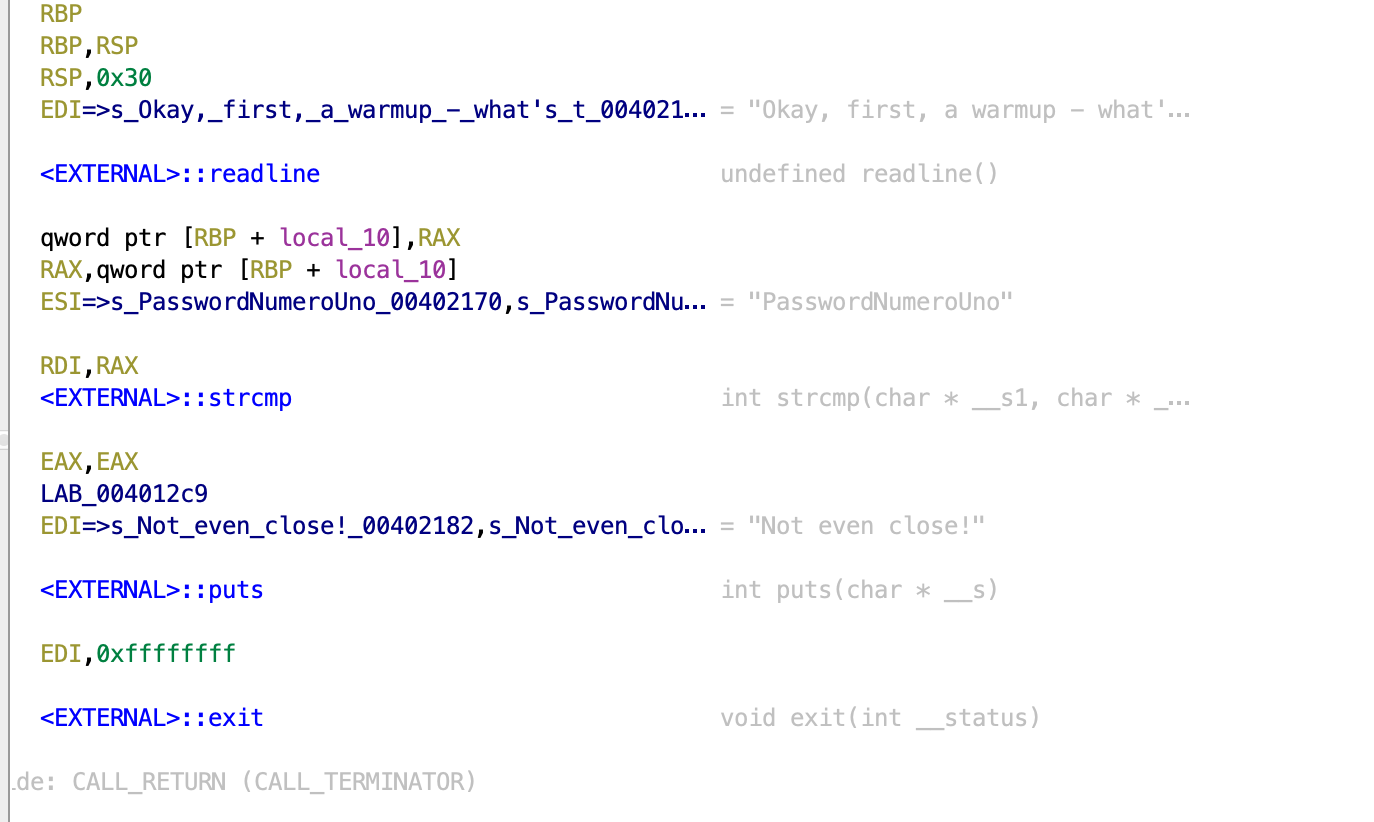
For the next 2 passwords, we did some breakpointing and examining of the register values. It’s quite troublesome and we essentially have to match the instructions addresses to see what is the password and our input. Running it in a debugger, it gave P4ssw0rdTw0 ThirdAndFinal!!! The flag is HTB{l1c3ns3_4cquir3d-hunt1ng_t1m3!}
5. Cave System (Reversing)
Going to the main function, it’s mainly a big gigantic if block, there’s more. But I’ll spare you this horrific sight.
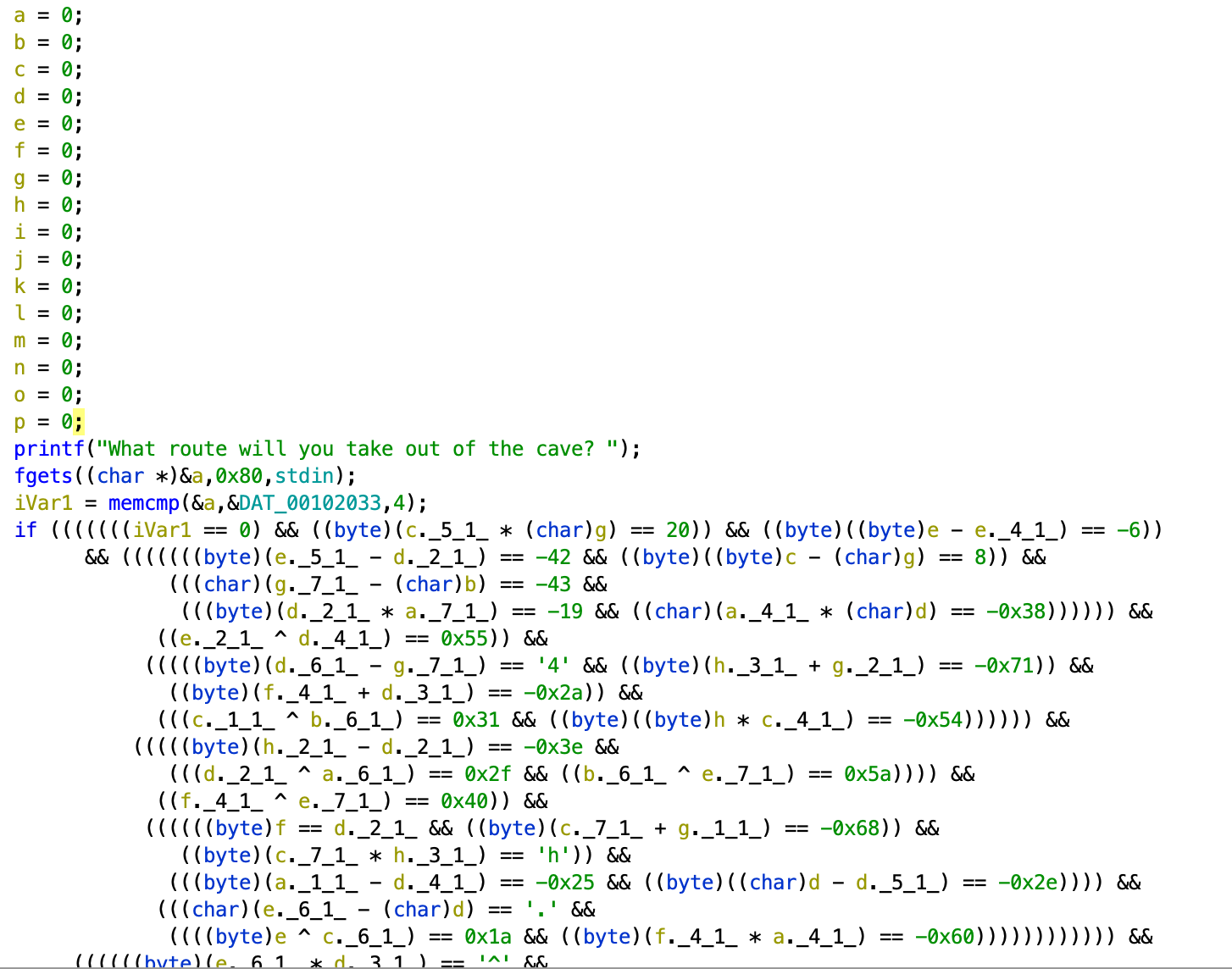
Anyway, I continued to work out each character :)
I created a table for the bytes in the flag. We can find what all the characters in the flag should be from the first four “HTB{“ Eg. if the first character of the flag (“H”) is xored with the 10th character and equals 0x34, then you can find the 10th character by reversing the operation…
Not gonna show the paper working because it’s so tedious and quite embarrassing because I realise they wanted us to automate it instead, obviously from the flag name HTB{H0p3_u_d1dn't_g3t_th15_by_h4nd,1t5_4_pr3tty_l0ng_fl4g!!!} well…
1. Persistence (Misc)
So a /get request can be done by refreshing the page. We need to find a way to refresh the page many, many times.
I wrote a python code to keep repeatedly send requests to refresh the page.
count=0
for i in {1..10000}; do
    curl -s "http://161.35.168.118:31892/" | grep -o "HTB{[^}]*}"
    count=$((count+1))
    echo "Processed $count requests"
done
We finally find the flag HTB{y0u_h4v3_p0w3rfuL_sCr1pt1ng_ab1lit13S!}
1. Reconfiguration (Machine Learning)
Today I learnt what’s orange, it’s like a mega powerful excel used for machine learning and data mining. I should explore it more soon especially with cs2109.
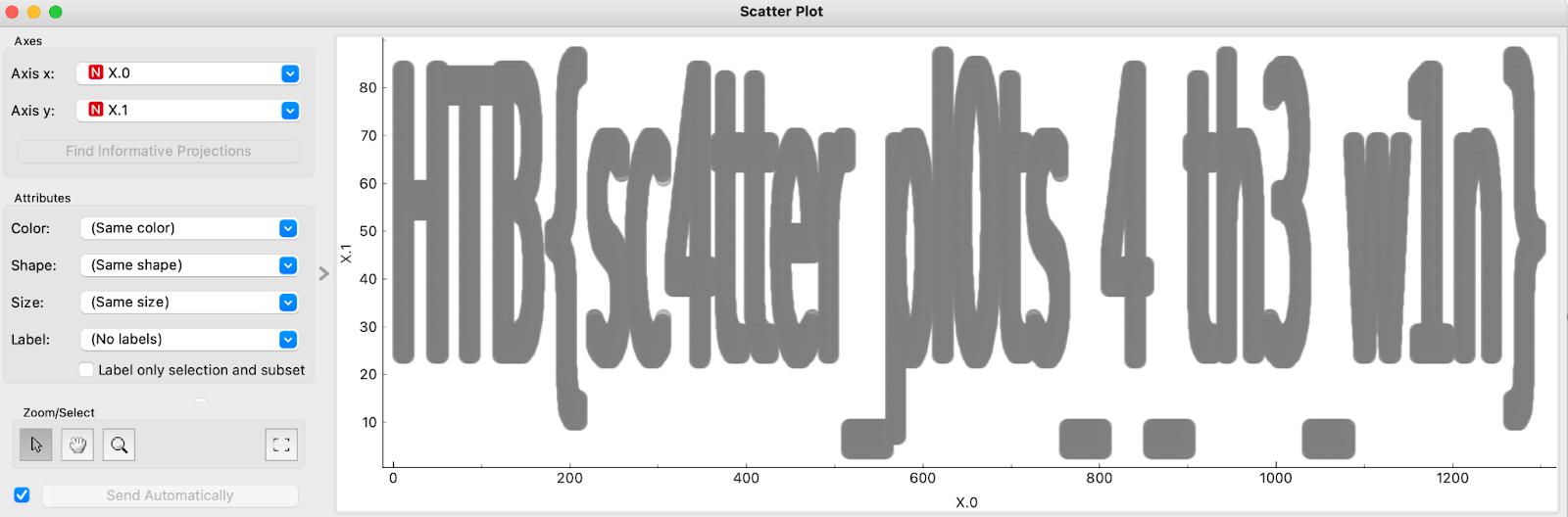
So I basically created two widgets and linked them together on the canvas where csv is the csv file. (I referred to this https://www.youtube.com/watch?v=vkkPkVCuN-U)
After double clicking scatter plot, we see the flag HTB{sc4tter_pl0ts_4_th3_w1n}.
1. Navigating the unknown (Blockchain)
First, we just connect to tcp server (second one - port number, ip).
From the tcp, we got
Private key     : 0xf3c1caf8f1440744a7da04cb12cc892618a3ee2e35bceec4583bb590fcabfcce
Address         :  0x96B974967FC1752691C957E0A62A8398424Ee139
Target contract :  0xf75e03C6d4cE060BF4853EAC88757a3174A35755
Setup contract  :  0xE9eE8FF42fe8A1a75aB3f09273B1d97b84bEcc1D
Idk much about blockchain but I googled real hard on how to use web3. First the aim: I’m gonna leave out the Setup.sol code cuz it’s just initialising stuff.
The main challenge is in Unknown.sol. The goal is obvious: we need to find a way to call the function updateSensors + update the version to 10. Only then we call updated == true, then TARGET() will be updated in Setup.sol in which we will be ready to open our tcp connection and 3 - Get the flag.
To make it clearer, we have to
- Update version to 10.
- Call updateSensors.
- Connect to the tcp server to get the flag since we’re ready.
This was given
ragma solidity ^0.8.18;
contract Unknown {
    bool public updated;
    function updateSensors(uint256 version) external {
        if (version == 10) {
            updated = true;
        }
    }
}
We use the web3 library to perform function calls in the smart contracts.
One of the fields required is abi. With some googling, we see that we can retrieve it via this website Solidity Compiler, add the header in the file // SPDX-License-Identifier: MIT
from web3 import Web3
import json


rpc_url = "http://46.101.73.33:31015"
web3 = Web3(Web3.HTTPProvider(rpc_url))

# set the default account to use for transactions
web3.eth.default_account = web3.eth.accounts[0]

abi = [  {    "inputs": [      {        "internalType": "uint256",        "name": "version",        "type": "uint256"      }    ],
   "name": "updateSensors",
   "outputs": [],
   "stateMutability": "nonpayable",
   "type": "function"
 },
 {
   "inputs": [],
   "name": "updated",
   "outputs": [
     {
       "internalType": "bool",
       "name": "",
       "type": "bool"
     }
   ],
   "stateMutability": "view",
   "type": "function"
 }
]

if web3.is_connected():
  print("Connected to the private chain")

private_key = "0xf3c1caf8f1440744a7da04cb12cc892618a3ee2e35bceec4583bb590fcabfcce"
account = web3.eth.account.from_key(private_key)

# given from the tcp connection 1 command
contract_address = "0xf75e03C6d4cE060BF4853EAC88757a3174A35755"

# create a contract object
contract = web3.eth.contract(address=contract_address, abi=abi)

# call the updateSensors() function with 10
tx_hash = contract.functions.updateSensors(10).transact()

web3.eth.wait_for_transaction_receipt(tx_hash)

is_updated = contract.functions.updated().call()
print(f'Updated: {is_updated}')
Then I got the flag to be HTB{9P5_50FtW4R3_UPd4t3D}.